The challenge
SAP customizing can be changed independently of the master data that uses it. Delete or change one value and hundreds of records become inconsistent — and nobody notices until a process fails.
What you get
- Broken master data caught before a process fails
- Fewer production and posting incidents
- Faster root-cause analysis, down to the affected record
- Configuration governance you can demonstrate
Typical findings
What X-Ray brings to the surface
- Groups and keys deleted while still assigned to records
- Values pointing to configuration that no longer exists
- Settings that nothing refers to any more
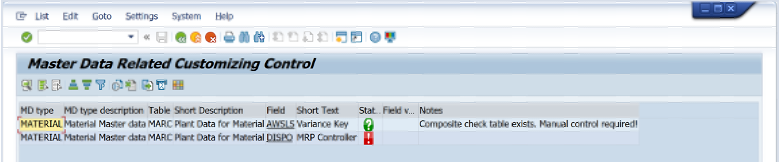
- Status light per field, drill-down to the records
How it works
From scan to improve
01
Scan
Read the relevant SAP customizing
02
Cross-check
Compare configuration with the master data in use
03
Impact
Show exactly which records are affected
04
Improve
Correct the records and close the gap
Example
A material group still used by active materials is deleted in customizing. X-Ray flags every affected material before the next process fails.
In the product
Request a Customizing X-Ray demo.
Book a demo →